What is SSL/TLS?
SSL (Secure Sockets Layer) is a standard security technology for establishing an encrypted link between a server and a client - typically a web server (website) and a web browser; or a mail server and a mail client (e.g.: Outlook). This link ensures that all data passed between the web server and browser remains private and integral. SSL is an industry standard and is used by millions of websites in the protection of their online transactions with their customers. In order to be able to generate an SSL link, a web server requires an SSL Certificate.
TLS (Transport Layer Security) is a widely adopted security protocol designed to improve privacy and data security of communications over the Internet. The main usage of TLS is to encrypt communication. TLS is the successor protocol to SSL. It is an updated, more secure, version of SSL. The two terms are often used interchangeably although SSL is still widely used.
SSL/TLS Certificates, as known as digital certificates, are small data files that digitally bind a cryptographic key to an organization’s details. Certificates are issued to companies or legally accountable individuals, SSL/TLS Certificates typically bind together domain name/server name/hostname, organizational identity (i.e. company name) and location. It will also contain an issued date and an expiry date and contain details of the certificate authority responsible for issuing the certificate.
When you purchase SSL Certificate via Nethub, you can use it with both SSL and TLS protocols.
An organization needs to install the SSL Certificate onto its web server to initiate secure sessions with browsers. Depending on the type of SSL Certificate applied for, the organization will need to go through differing levels of vetting. Once installed, it is possible to connect to the website over HTTPS, as this tells the server to establish a secure connection with the browser.
When a browser connects to a secure site it retrieves the site's SSL certificate and checks that it has not expired, that it has been issued by a Certificate Authority the browser trusts and that it is being used by the web site for which it has been issued. If it fails on any one of these checks the browser will display a warning to the end user. Once a secure connection is established, all web traffic between the web server and the web browser will be secure. Browsers tell visitors a website is SSL secure via several visible trust indicators:
Without using SSL display:
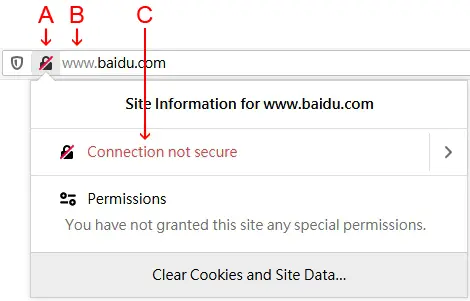
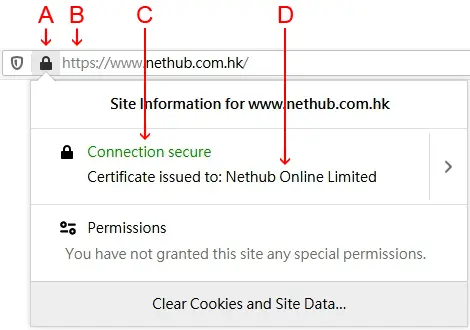
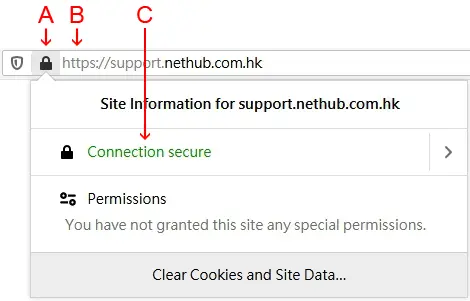
A: The padlock is activated next to address bar. If there is no padlock or the padlock shows a broken symbol, the page does not use SSL.
B: The standard HTTP is changed to HTTPS, automatically telling the browser that the connection between the server and browser must be secured using SSL.
C: "Connection secure" message is showed to let visitors know that the browser connection to the server is now secure.
D: The web site owner's legally incorporated company name is displayed under the message of "Connection secure". Extended Validation (EV) SSL is the only way for a company to get its name displayed in this position of browser.
Extended Validation (EV) SSL Certificates display:
Standard SSL Certificates display:
* Above reference images are from Firefox Version 74
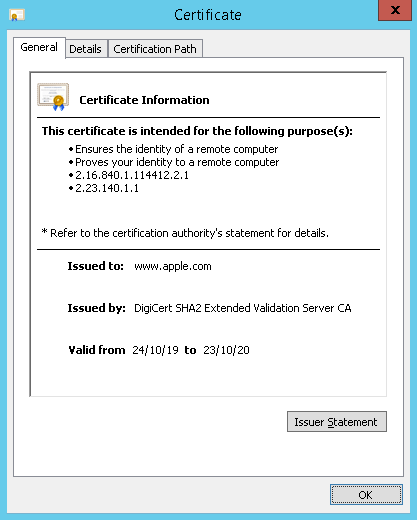
* Above reference image is from Chrome Version 80